|
|
|
TAG file format |
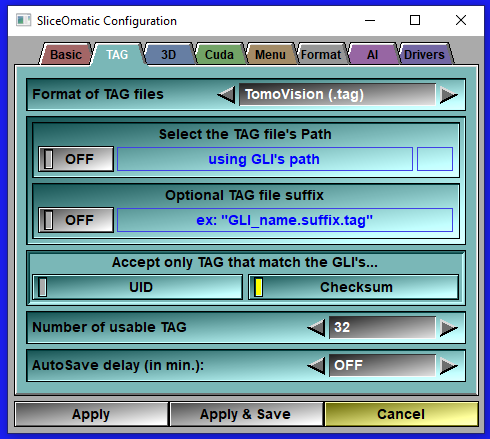
You can read/write the TAG files that contain the image's segmentation in 3 different file format. The "TomoVision" file format (.tag files), The "DICOM" (.seg files) or the "NIfTI" (.nii files). The default is the "TomoVision" file format, and unless you have specific reason for using another file format we strongly suggest you keep it the select format. Some tools (such as the Multi-TAG tools, expect the TomoVision file format. The "TomoVision" file format is very simple and is described in the Appendix D.
|
TAG path |
The Tag files can be placed either with the GLI images, or in a specified directory.
|
TAG Suffix |
You can add a suffix after the file name and before the ".tag" extension. The syntax will be: "GLI_name.suffix.tag". So if for example you have the GLI file: "toto.dcm" and you select "demo" as suffix, then the name of the associated TAG file will be: "toto.dcm.demo.tag". The suffix is useful if you want to have multiple users segmenting the same data. You just assign a different suffix to each user, and the can all share the same GLI files.
|
TAG/GLI match |
When sliceOmatic read a GLI file, it will automatically try to fetch the matching TAG file(s). It does this using the name of the GLI file and either adding or replacing the file's name extension with the TAG file extension. If it does find a matching TAG file, it will then check if that file is really associated with the GLI file. The TAG file contain 2 informations that are derived from the GLI: A UID and a checksum. If these values from the TAG file do not match the values computed from the GLI file, we reject the association. However, old TAG files did not contain these, and at some point the UID computation changed. So, if your TAG files are rejected while you would want otherwise, you can disable these checks.
|
TAG Number |
The number of Tag values that you can use in the program can be changed. You have a choice of 16, 32, 64, 128 or 256 Tag values. If you are only using a few Tag values, decreasing the number of usable Tags will make for less crowded interfaces. The default value is 128.
|
3D TAG files |
By default, we create one TAG file per slices even for 3D GLI files. You can ask sliceO to create 3D TAG files if your GLI files are 3D.
|
Auto-load buffer |
You can ask the program to automatically load the TAG files in the erase buffer. This was the default in older versions of sliceO, but some users had difficulties with it, so now the default is to clear the erase buffer for all new files.
|
Autosave |
All modified Tag values will be saved to file automatically at regular intervals. You have a choice of values ranging between 1 and 120 minutes. By default, this option is disabled. |