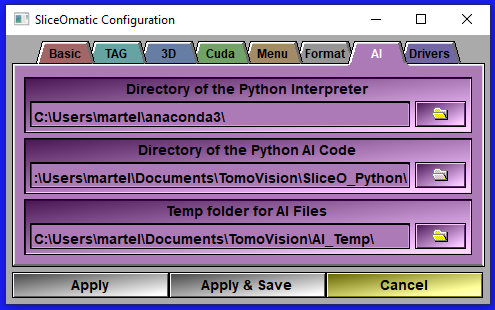
This page is only present if you installed one or more of the AI modules.
|
|
|
||
Interpreter's path |
When using the AI modes, sliceOmatic need to know where the Python interpreter is located in your computer.
The program will locate this directory for you. It can not be changed with this interface.
|
||
Python code path |
The AI modes used Python files for the different models and metrics. You need to specify the path to these files. By default they are installed in a "SliceO_Python" sub directory of your scratch file.
|
||
AI temp folder |
The AI modes will create a lot of temporary files (up to 100 set of files while training) and may need more than 20Gb of disk space! By default this temporary folder is located in your document folder under "TomoVision\AI_Temp".
If your "Document" folder has been hijacked by OneDrive, it may be a good idea to place the temp folder somewhere else...
|
||
Validation history |
During training, the program save the weights regularly, you can also have the program use these weights to predict the segmentation of the validation images at the same time. The interface can then display these results, enabling you to follow the training's progress.
You have 3 choices:•"off" disable the graphic prediction of the segmentation of the validation files. •"latest" only keep the the results for the latest epoch. •"history" compute the values regularly and enable you to scroll through the different epochs.
Note:
Note:
|