This class enables multiple GLI frames to be associated to the same TAG frames.
|
|
|
|||||
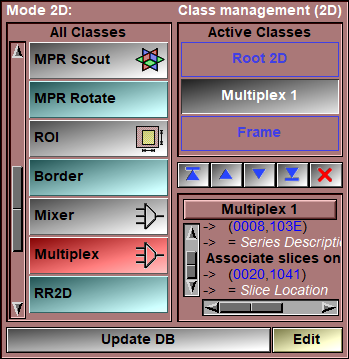
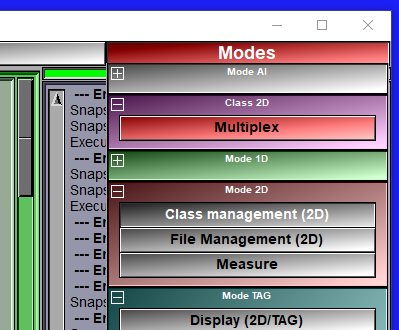
Multiple instances of the class will be created depending on the "discriminate" DICOM tag. Each of these classes will be a "channel". In each of these channels, the frames that share the same value for the "associate" DICOM tag will share the same TAG file.
The actual TAG files will be associated with the selected channel.
For example: We have 4 files, "A.dcm", "B.dcm", C.dcm" and "D.dcm", each containing 1 image. The first 2 files "A" and "B" have the parameter (008,103E) "Series Description" = "FAT" and the 2 last files "C" and "D" have "Water". File "A" and "C" are located at z=10.0 (the DICOM parameter (0020,1041) "Slice Location" = 10.0), and "B" and "D" have z=20.0.
|
|
File Names |
(008,103E) "Series Description" |
(0020,1041) "Slice Location" |
|
|
A.dcm |
FAT |
10.0 |
|
|
B.dcm |
FAT |
20.0 |
|
|
C.dcm |
Water |
10.0 |
|
|
D.dcm |
Water |
20.0 |
If we only add the "Multiplex" to the default "Root" and "Frame" classes in the "DB Class Management" mode, then the database tree will look like this:
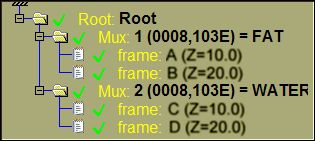
Frames A and C will share the same TAG file, as do frames B and D.
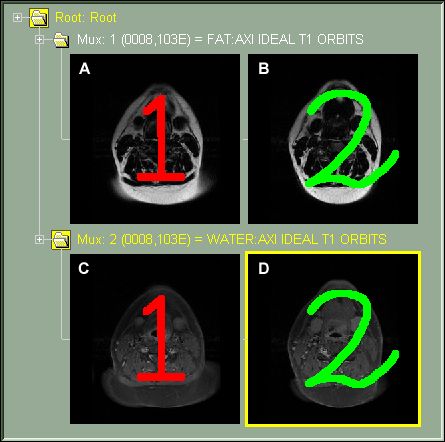
If the TAG are associated with the channel 1, then the TAG files will be "A.dcm.tag" and "B.dcm.tag".
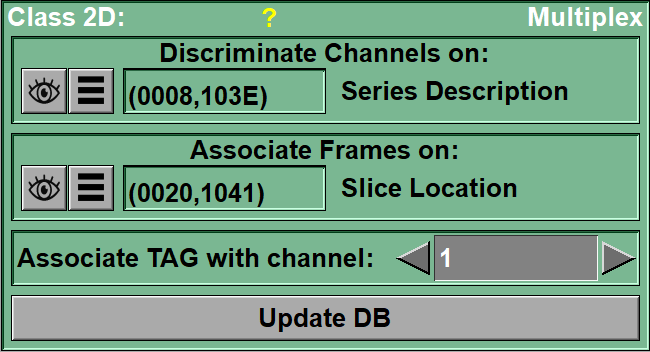
From the Graphic Interface
|
|
|
The value of this parameter decides in which channel the frames from each file will go.
You can select the parameter from a pull-down list using the
The parameter can be a DICOM tag or one of the accepted key-words: "path", "name", "ext", "suffix", "time", org", "pos", for", study", "series", "image", acquisition" or "modality".
DICOM tag are the form (xxxx,yyyy) where "xxxx" is the DICOM group and "yyyy" is the DICOM tag.
In some cases, you may want to discriminate on a specific key-word inside a DICOM tag. You can do this by enable the "Key Words" button, typing the keywords (separated by ";") and pressing "Enter" to activate the filter. You need one key-word for each channels.
|
|
The value of this tag will be used to match frames across channels.
You can select the parameter from a pull-down list using the
The parameter can be a DICOM tag or one of the accepted key-words: "path", "name", "ext", "suffix", "time", org", "pos", for", study", "series", "image", acquisition" or "modality".
DICOM tag are the form (xxxx,yyyy) where "xxxx" is the DICOM group and "yyyy" is the DICOM tag.
In some cases, you may want to associate frames on a specific key-word inside a DICOM tag. You can do this by enable the "Key Words" button, typing the keywords (separated by ";") and pressing "Enter" to activate the filter. You need one key-word for each association.
|
|
|
This parameter decides the file name for the TAG files. Only 1 channel has actual TAG files, all the other channels are associated with these TAG files.
|
|
|
Recompute the database tree using the new parameters. |


From the Display Area
Any modifications done to the TAG values of a frame will immediately be visible in all the associated frames.
From the Keyboard
There is no keyboard interface specific to this class.
From the Command Line
Commands recognized in this library:
Multiplex: Tag [t_level] channel_id
Set the "Tag" parameter for the different levels of the class. This parameter is used to select which of the channels will have the associated TAG files. The TAG files are accessible by all channels, but when they are saved, the file name is based on the selected channel.
Multiplex: Associate [t_level] group element
Set the "Associate" parameter for the different levels of the class.
Multiplex: Discriminate [t_level] group element
Set the "Discriminate" parameter for the different levels of the class.
|
|
|